|
|
|
|
|
 |
 |
News |
 |
 |
|
|
| Radio Toolbox v2 Beta 4 Released! by Jay |
05/02/2012 |
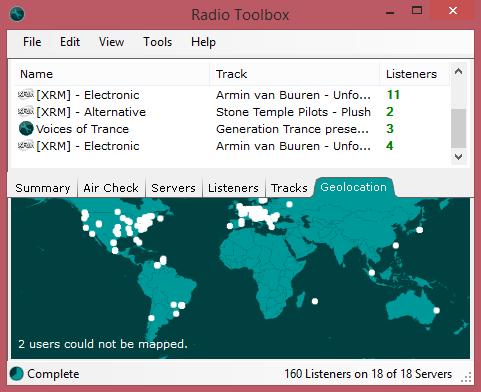
If you've been following the beta releases of Radio Toolbox v2. A major update has been made available today. Going against normal convention, I am releasing 2 major new features unavailable in Radio Toolbox v1 or any stats gathering program I have ever seen.
First, "Air Check". Air Check allows Radio Toolbox to tune in silently to a stream and listen for audio problems. The current version allows silence detection. Simply set a floor decibel value and the amount of time that it "hears" audio below that floor. Alerts will be made on the Air Check display and can also trigger a Notifier. You can use any of the following Notifier tags to build an email, html page or hit a script.
%_STATION_AUDIO_CHECK_SUCCESS_%
%_STATION_AUDIO_DBV_RIGHT_%
%_STATION_AUDIO_DBV_LEFT_%
%_STATION_AUDIO_CHECK_INTERVAL_%
%_STATION_AUDIO_DBV_MINIMUM_%
A big new feature that I wanted to see in v1 was server administration. Radio Toolbox v2.0 adds this in the Listener tab. Simply supply your Mount or Admin username and password (whichever has access to the most features) and you can kick, ban reserve ip's all from within Radio Toolbox in one consolidated listener screen. This window is going to be dramatically changed by release to include more information about listeners than you have ever been able to retrieve in Radio Toolbox.
It's been a long road to get here, but I hope that the many updates you are seeing show that I am serious about resurrecting this project. If you are interested in testing out preproduction software and understand the risks. Grab your copy today. |
| Radio Toolbox Introduction Video by Jay |
04/24/2012 |
I have produced a small tutorial video outlining the benefits of the new version of Radio Toolbox. This video will give you a fairly good walk through of setting up and using Radio Toolbox v2 for the first time.
Oh and by the way, Beta 2 was released which fixes some issues with Icecast 2.
Feel free to view the video at http://www.radiotoolbox.com/tutorials/Radio%20Toolbox%20Introduction/ |
| Radio Toolbox v2 Beta by Jay |
04/19/2012 |
So yes, it's been quite a while for another update. But things are progressing, even if slowly. Radio Toolbox v2 is finally ready for a wider beta test. If you have been on the verge of giving up on there ever being a new version of Radio Toolbox, well it is almost here. You can find more about the new Beta in our forums.
If you aren't quite so adventurous then I can go into a little bit of detail about what is new and different about Radio Toolbox v2.
Radio Toolbox v2 improves vastly on the old version by introducing the concept of the Station to Radio Toolbox. You start the application in a Station Index View. The behavior is very similar to a file system folder. Except this item will hold all of this specific station's servers. We take it a step further by allowing you to grab links from web pages. This makes aggregating your servers into one place very possible. No more having to remember all the different servers or even worrying about the stats you miss by other's relaying your station. This new organization structure also allows you to seperate stats based on mediums targetted, codec, or bitrate.
The Station index makes it easy to see at a glance the situation with your servers, the more servers that are unavailable the more the heat map takes over to quickly get your attention on a specific group of servers.
Listener figures color code based on trending information and finally, the online log graph that so many of you love is integrated right into Radio Toolbox. Station playlist creation is as easy as a drag and drop of a Station item to the desktop.
Want Radio Toolbox to just track other stations? It's perfect for that, slip on over to Tools -> Options and set "Play on Station Double Click". Now Radio Toolbox can be your Internet Radio Favorites manager. Just click and drag any playlist links from your browser into the station index and double click to listen immediately to the station.
There is so much new and different about this version that I will probably be spending the next year writing books and producing tutorials on all of the power it gives you. Happy broadcasting! :) |
|
|
 |
|
 |
 |
 |
Development |
 |
 |
|
|
| Mp3 Toolbox 1.0 beta 6 |
Rel:12/01/2007 |
| Mp3 Toolbox is an online php script which functions as an ondemand server as well as a a source for your Shoutcast/Live365 server. Functions planned include scheduled playlist sets, as well as functioning as a all in one server for all your streaming needs. See a Demo. | | [Download] - [Documentation] | |
|
| Steamcast 0.9.75 beta |
Rel:11/21/2006 |
| Steamcast is a cross platform multimedia server which delievers the best of both SHOUTcast and Icecast in one package. Features include, SHOUTcast Style and Icecast2 style sourcing support, content agnostic media handling archetecture (allows MP3, AAC(+), NSV/A and countless others), support for the container format OGG, Webpanel, Media Player agnostic, ability to list on SHOUTcast.com and Icecast2 style directories, and on-demand/file to live support. | | [Download] - [Documentation] | |
|
| Radio Toolbox 1.1.1 |
Rel:01/04/2005 |
 | Radio Toolbox brings some ease to site interaction, and to gathering stats about all of the servers inside your network. Server Support includes SHOUTcast, Steamcast and Icecast2. Features include, a quite complete web administration panel, Script Service for sending stats to a Server through a server side language like PHP, ASP, or CGI. FTP Service for sending stats to a remote server via FTP. For a more complete feature list check out the faq. | | [Download] - [Documentation] | |
|
|
|
 |
|
 |
|
|